
Roadpack guides
How to plan a road trip with multiple cars
The secret to a relaxed trip in several cars is not keeping every bumper in sight. It is making sure everyone knows the plan and what to do when the cars naturally separate. A little agreement before departure leaves more room to enjoy the road.
Choose the kind of day before choosing every stop
Start with the destination and the people coming along. Is this a direct drive to a weekend stay, or a day built around stops? Ask about the latest comfortable arrival, meal needs, walking preferences, and anything that would make a long stretch difficult for someone.
Use those answers to choose a small number of priorities. A packed itinerary can be harder on a group than a longer drive with room to pause. Keep optional stops clearly optional so nobody feels that one delayed departure has spoiled the entire day.
Give every car the same route and meeting details
Choose a starting place with legal parking and enough room to gather. Share its exact location, the departure time you have agreed on, and the destination. Make sure each driver can find those details independently. Different starting points are fine if the group has an obvious place to meet.
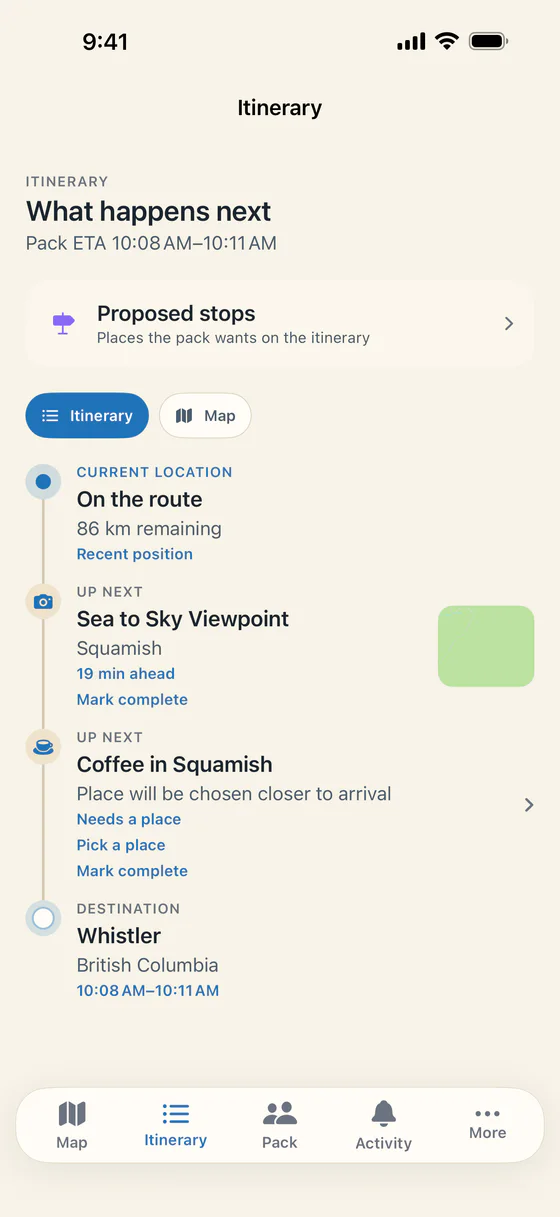
Roadpack lets an organizer create a shared trip and invite people with a code or QR code. The group can use one itinerary instead of passing around separate screenshots. Core coordination works as a guest, so everyone can join without creating an account.
Plan to separate in traffic
Agree before leaving that nobody needs to speed, follow closely, or hurry through a light to stay with the group. Every driver is responsible for their own vehicle and the road ahead. Being part of a convoy does not change road rules or the need for space.
Pick a sensible regroup location for each part of the route. If someone misses a turn, they should continue safely and make a new plan from a suitable stopping place. Use proper parking areas for meeting up. Do not make a highway shoulder your default waiting spot.
Decide how the group will choose breaks
Talk about the likely need for fuel, charging, meals, and restrooms before setting off. You do not need to predict every request, but it helps to know that one vehicle may need a break before another. Leave room in the itinerary for that difference.
Roadpack supports stop requests and group voting, with route-aware options and detour information. A passenger can help propose a stop while drivers stay focused. Once agreed, the route can be handed to Apple Maps. Our convoy tracking guide explains the shared live map that sits alongside that plan.
Agree on shared costs while everyone is comfortable
Choose whether fuel is shared within each car or across the whole group. Decide how to handle groceries, parking, and activities that only some people join. Make sure everyone understands the agreement before one person starts paying for shared purchases.
Roadpack has free expense entry and supports splits for the Pack or one vehicle. Settle Up is an optional Pro feature. Read how to split road trip costs for a practical way to record purchases and check them without turning the holiday into an accounting project.
Give passengers a role and keep a simple backup
If a car has a passenger, ask them to handle stop suggestions and check the group plan. A driver travelling alone should wait until safely stopped before interacting with the app. Charge phones before departure and bring the charging equipment your cars need.
Write down the destination and the next meeting place somewhere everyone can find them. A shared live map is helpful, but the group should still understand what to do if they cannot check it. Avoid building the day around constant updates from every car.
Finish with a quick check and a shared memory
Once everyone arrives, check that shared purchases have been recorded and that the return plan is clear. Roadpack also has a shared album and Recap and Rewind for revisiting the drive. Video exports are part of Pro, while the core tools for coordinating the trip stay free.
For a route idea, try our Vancouver to Whistler guide and choose the stops that suit your group. Explore the group road trip app overview or return to the Roadpack homepage to see how the app brings the plan together.
Use a draft to start the conversation
In Roadpack, the organizer can choose interests, pace, and daily driving hours before asking Plan it for me to draft stops along the route. Overnight and charging stops can be part of that draft. The organizer chooses what to propose, and the Pack votes on each stop. Every trip gets one free plan, with more in Pro.
Use the departure lobby to set the leaving time and check that each car is ready. Passengers can handle Pack Radio and games once the trip is under way. CarPlay carries the Pack, quick statuses, and stop votes on a compatible car screen. Explore the interactive feature tour before your group sets off.
Bring the Pack together on your next drive.

Free on iPhone. Optional Roadpack Pro features are available in the app.