
Roadpack guides
A group road trip app for the whole Pack
A group road trip has two parts: the places you want to see and the people you want to get there with. When those people are spread across several cars, keeping everyone on the same plan takes a little more thought. Roadpack brings the shared parts of the drive into one iPhone app.
Start with one trip everyone can join
Think of a weekend away with friends. One car leaves from your place, another picks people up across town, and a third joins later. The destination is clear, but the details can quickly spread across messages, screenshots, and separate conversations.
In Roadpack, the organizer creates a trip and shares an invite code or QR code. The group joins the same trip and works from one itinerary. Core coordination can be used as a guest, so an account is optional. Before departure, ask everyone to join and check the plan while they are still parked.
See the cars on one live map
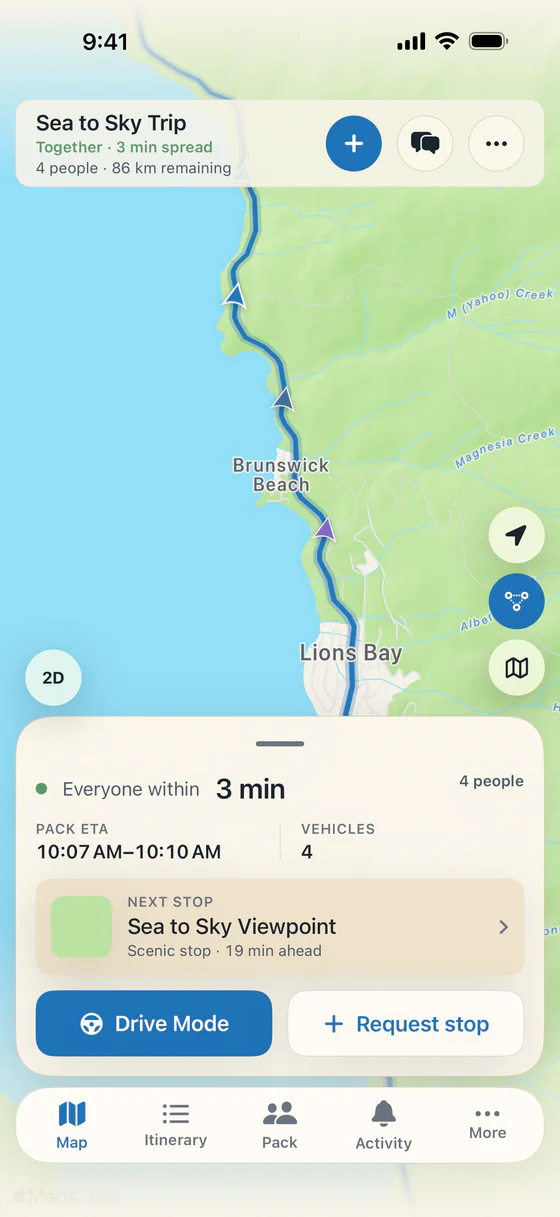
Once the drive is under way, the live Pack map shows the vehicles travelling together. You can see who is ahead and who is behind without asking someone in every car for an update. It gives passengers a shared picture of the group as the drive unfolds.
There is no need to stay bumper to bumper. Each driver should leave a safe following distance, follow road signs, and make their own decisions in traffic. A shared map helps the group coordinate without making the road a race. Read more about this in our convoy tracking guide.
Make the next stop a group decision
Someone needs fuel, another car wants coffee, and everyone could use a stretch. Roadpack lets the group request stops and vote on them. The existing stop tools look along the route, show the detour, and help the Pack agree on what happens next.
That is useful when the original itinerary needs to change. A passenger can propose the break while drivers keep their attention on the road. Once the group has agreed, navigation can be handed to Apple Maps. Roadpack holds the group decision, and your navigation app handles directions.
Keep shared spending understandable
Road trip spending rarely happens in one neat payment. One person buys fuel, someone else covers parking, and a third pays for groceries. Roadpack includes shared trip expenses, with splits for the whole Pack or just the people in one vehicle.
Expense entry is free. Settle Up is part of Roadpack Pro and adds balances and who-pays-whom settlement tools. Agree on what counts as a shared purchase before the trip, then record it while the details are fresh. Our guide to splitting road trip costs walks through a simple approach.
Keep something from the drive
The trip does not have to disappear into an old chat when everyone gets home. Roadpack has a shared album for photos and short videos, plus Recap and Rewind to revisit the journey. Watching those trip memories and exporting a video are different features: video exports are part of Pro.
Core coordination is free, including creating and joining trips, the live map, stop voting, regrouping, chat, and expense entry. Pro is optional. Check the app for the current plans and prices if you want its extra tools or memory features.
Plan a drive that leaves room for people
A useful group plan does not need to schedule every minute. Pick a meeting point, a destination, a few likely breaks, and a place to regroup if the cars separate. Allow time for different walking speeds, meals, and the unexpected stop that becomes the best part of the day.
For a practical checklist, read how to plan a road trip with multiple cars. For a route to try from Vancouver, explore our Sea to Sky Highway guide. You can also return to the Roadpack homepage to see the app in action. Have a passenger use the app, or stop safely before interacting with it.
Keep the conversation with the Pack
CarPlay brings the Pack, quick statuses, and stop votes to the car's screen. Passengers can use Pack Radio to talk between cars, play road bingo or trivia, and open a shared playlist link. Before departure, Plan it for me drafts stops along your route for the Pack to vote on. Every trip gets one free plan; Pro adds more.
You can also set a departure time and see each car get ready. An invite can open the App Clip before installation, while a free follow link shows approximate arrival to someone waiting at the destination. The interactive feature tour shows the new screens and explains which planning extras are Pro.
Bring the Pack together on your next drive.

Free on iPhone. Optional Roadpack Pro features are available in the app.