
Roadpack guides
A convoy tracking app for trips in separate cars
Travelling together does not always mean travelling in the same car. Friends, families, and weekend crews often need several vehicles. A convoy tracking app gives the group a shared view of the drive, so a red light or a slower stretch does not turn into a round of location messages.
What a shared convoy map is useful for
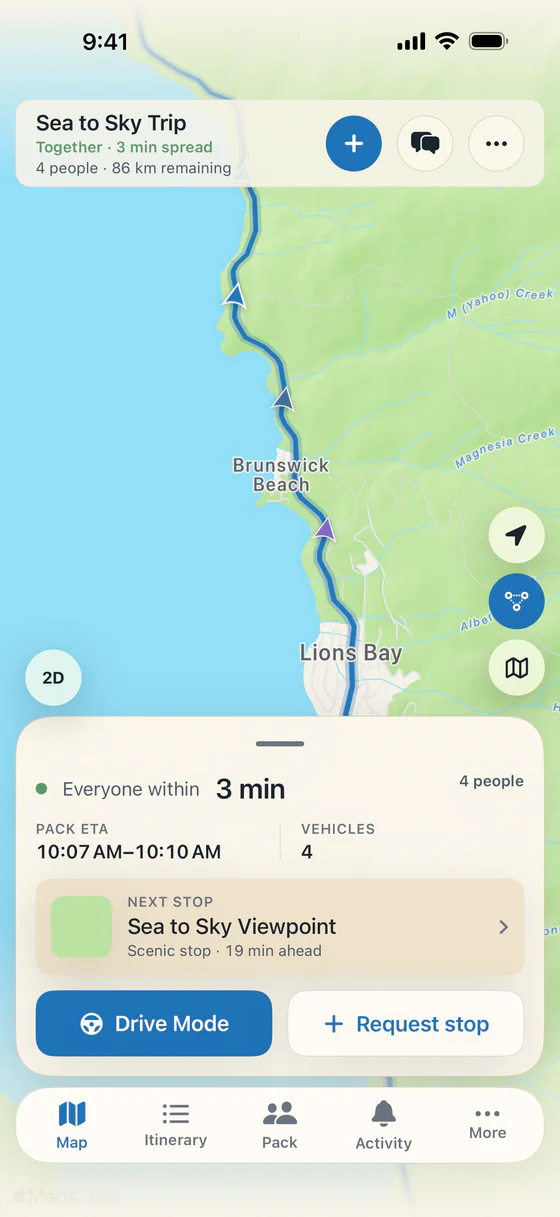
A normal route tells you where you are going. A shared convoy map helps you understand where the other cars are along the way. Roadpack shows the vehicles in your Pack on one live map, including who is ahead and who is behind.
Imagine leaving a busy town in three cars. One gets through a light, one stops, and another is still pulling out of the meeting place. Seeing the group makes that separation easier to understand. Nobody needs to rush through a light to keep the convoy visually together.
Set up the Pack before departure
The organizer creates a trip in Roadpack and shares the invite code or QR code. Each car joins the same trip. Everyone can work from a shared itinerary rather than separate copies of a route that may change as the day goes on.
Do this before driving. Confirm the destination, choose a first regroup point, and make sure each car has a passenger who can handle changes where possible. Core trip coordination works in guest mode, with no account required. Roadpack is free to download for iPhone, with optional Pro features.
Leave space between cars
A car caravan app should support a relaxed trip. It should never be a reason to follow too closely, speed up, or stop somewhere unsuitable. The group can travel together while drivers leave the space they need and follow the road conditions in front of them.
Agree that cars may separate in traffic. If someone misses a turn, continue safely and use a suitable planned meeting point. Have a passenger check the shared map or stop safely before using the app. Live location is useful context for coordination, not a reason to make a hurried manoeuvre.
Turn a stop request into one shared decision
Caravans have different needs. One vehicle might need fuel while another is ready for lunch. Roadpack lets the Pack request and vote on stops, then keep the agreed plan together. Its route-aware stop tools show options along the road and the detour involved.
Regroup points are useful when cars leave at different times or a stop does not suit everyone. Choose a specific place where vehicles can park legally and people can wait comfortably. For the full setup, use our multi-car road trip planning checklist.
Keep coordination separate from directions
Roadpack helps the group agree on the journey and see the Pack. The agreed route can be handed to Apple Maps for navigation. Give every driver the destination before departure so they know the overall plan even when they are concentrating on their own directions.
Before a longer drive, make sure phones are charged and everyone knows what to do if they cannot check the map. Choose the next meeting place in advance. Do not assume a live app will remove the need for a simple plan that everyone understands.
Understand when location is shared
Roadpack shares live location with people on the current trip. Live sharing stops when you leave or the trip ends. That is distinct from the trip recap, which can keep the route driven during the journey. Read the privacy policy for the details of trip data and retention.
The free coordination tools include the live Pack map, stop voting, regrouping, chat, and expense entry. Settle Up and Recap or Rewind video exports are optional Pro features. Our cost splitting guide explains how to organise the spending side of a convoy.
Try it on your next shared drive
Start with a route your group already wants to drive. The Sea to Sky Highway from Vancouver to Whistler is one example with several possible stops. Choose only the breaks that fit your day. Explore the group road trip app overview or visit the Roadpack homepage for a closer look at the app.
Keep the conversation between cars simple
Roadpack includes Pack Radio for passengers to hold to talk to the other cars. Voice clips appear in trip chat and disappear after a day. CarPlay shows the Pack, quick statuses, and stop votes with one large Yes or Skip. Both are part of free coordination.
A friend can join through an App Clip before installing the full app, sharing location while the clip is open. Someone waiting at the other end can use a free follow link to see approximate arrival without vehicle positions. See the interactive feature tour for the app screens and the full free and Pro distinction.
Bring the Pack together on your next drive.

Free on iPhone. Optional Roadpack Pro features are available in the app.